 Sometimes taking a good picture involves a bit of good luck and being in the right place at the right time. That's just what happened in Morges, Switzerland, a couple of days ago. I was riding back on my bike after buying some coffee when I noticed the silhouette of the Morges church reflected in the lake, with that spectacular sunset in the background. It was definitely a moment that called for me to stop and take this shot!
Right place at the right time in Morges
Sometimes taking a good picture involves a bit of good luck and being in the right place at the right time. That's just what happened in Morges, Switzerland, a couple of days ago. I was riding back on my bike after buying some coffee when I noticed the silhouette of the Morges church reflected in the lake, with that spectacular sunset in the background. It was definitely a moment that called for me to stop and take this shot!
Winter World Cup
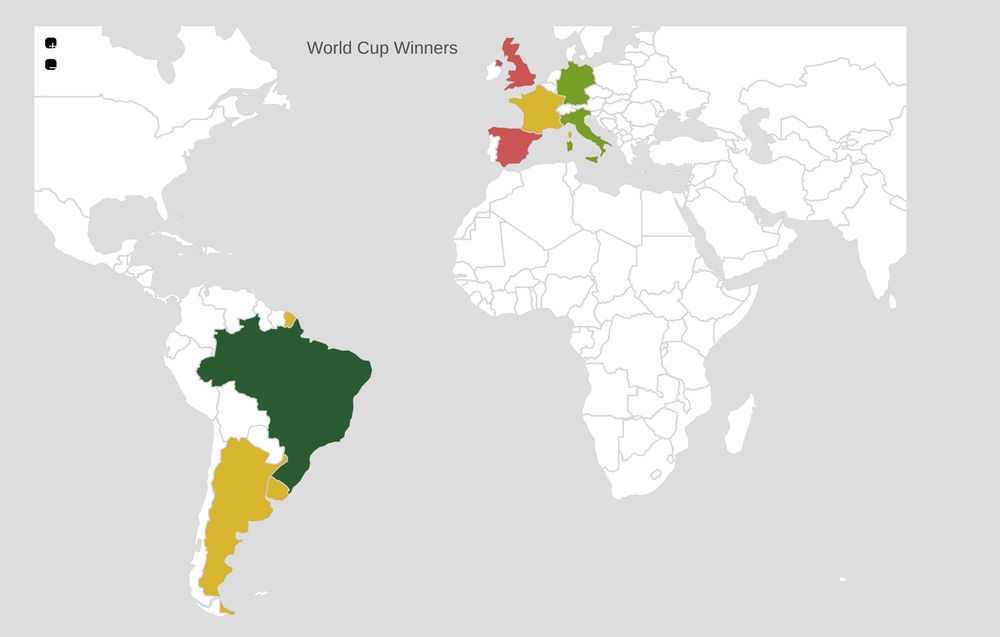
A couple of days ago I was chatting to one of my colleagues about how this World Cup has been really weird. Leaving aside all the justified controversies about the way Qatar treats migrant workers, the fact that this World Cup is being played at Christmas time has been really strange. Since I live in Europe, I have always associated this event with summer and people enjoying themselves outside, watching the games and having a good time. That has not been the case in 2022.
Now I wonder if any of the countries that have won the cup before will manage to do it again? Italy didn’t even qualify, Spain is out this week, Germany and Uruguay didn’t make it past the first round. So, could it be Brazil or Argentina again, or European teams like France or the UK? We will see soon, but again this winter cup has lost a bit of its charm.
Amazing Bernese Alps in the Background
 Yesterday when we were on our way home, my girlfriend pointed out the window and said, "Look, look there in the background." I couldn't see at the beginning what she was talking about, but then the amazing Bernese Alps were on full display in the background. I quickly snapped this shot with my phone, which you can see in the picture above. Really nice!
Beautiful Sunset Sky in Vaud
 A couple of days ago I was testing my electric bike, doing a ride from the university to Vevey (about 25 km). At some point when the sunlight was starting to dim, I decided to stop and look back and I saw this beautiful sky that I captured in the photo you find in this post.
Map, Filter and Reduce in JS
JavaScript Fundamentals
JavaScript is a high-level, dynamic, and interpreted programming language. It is one of the core technologies of the World Wide Web, alongside HTML and CSS. JavaScript allows developers to make web pages interactive, enabling features such as dynamic content updates, form validations, and complex user interfaces.
Key Concepts
Variables and Data Types
JavaScript is dynamically typed, meaning you do not need to explicitly declare the data type of a variable. The primary data types include:
- String: Textual data (e.g.,
"Hello World"). - Number: Numeric data (e.g.,
10,3.14). - Boolean: Logical data (
trueorfalse). - Object: Complex data structures (e.g.,
{ key: value }). - Array: Ordered lists of values (e.g.,
[1, 2, 3]).
Declaration Keywords:
var: Older way to declare variables (function-scoped).let: Used for variables that might be reassigned (block-scoped).const: Used for constants—variables whose value cannot be reassigned (block-scoped).
Functions
Functions are blocks of reusable code designed to perform a specific task. They help organize code and prevent repetition.
// Function declaration
function greet(name) {
  return "Hello, " + name + "!";
}

// Arrow function (modern syntax)
const calculateArea = (width, height) => {
  return width * height;
};

console.log(greet("Alice"));
console.log(calculateArea(5, 10));
Control Flow
Control flow statements determine the order in which code is executed.
- Conditionals (
if/else if/else): Execute code blocks based on whether a condition evaluates totrueorfalse. - Loops (
for,while): Execute a block of code repeatedly until a specified condition is met.
// For loop example
for (let i = 0; i < 5; i++) {
  console.log("Count: " + i);
}

// While loop example
let count = 0;
while (count < 3) {
  console.log("Still counting...");
  count++;
}
Working with the DOM (Document Object Model)
The DOM is the programming interface for HTML and XML documents. JavaScript uses the DOM to read, modify, and manipulate the structure and content of a web page.
Selecting Elements
You can select HTML elements using methods like getElementById, querySelector, and querySelectorAll.
// Selects the element with the ID 'main-heading'
const heading = document.getElementById('main-heading');

// Selects the first element that matches the CSS selector '.card'
const firstCard = document.querySelector('.card');

// Selects all elements that match the CSS selector '.card'
const allCards = document.querySelectorAll('.card');
Manipulating Content and Styles
Once an element is selected, you can change its content or styling.
// Changing text content
heading.textContent = "Welcome to JavaScript!";

// Changing HTML content (use with caution due to XSS risks)
heading.innerHTML = "Welcome! <strong>Learn More</strong>";

// Changing CSS styles
firstCard.style.backgroundColor = 'lightblue';
Handling Events
Event listeners allow your JavaScript code to respond to user actions, such as clicks, key presses, or mouse movements.
const button = document.getElementById('myButton');

// Attaches a function to run when the button is clicked
button.addEventListener('click', () => {
  alert('Button was clicked!');
});
Asynchronous JavaScript
Many operations in web development, such as fetching data from an API or setting a timer, do not complete instantly. These are asynchronous operations. JavaScript handles these using mechanisms like Promises and async/await.
Fetching Data (API Calls)
The fetch() API is the modern way to make HTTP requests.
async function fetchUserData(userId) {
  try {
    // The 'await' keyword pauses execution until the Promise resolves
    const response = await fetch(`https://api.example.com/users/${userId}`);

    if (!response.ok) {
      throw new Error(`HTTP error! status: ${response.status}`);
    }

    const data = await response.json();
    console.log("User data:", data);
    return data;

  } catch (error) {
    console.error("Could not fetch user data:", error);
  }
}

// Example usage:
fetchUser(1);
Summary of Key Concepts
| Concept | Purpose | Example |
|---|---|---|
| DOM Manipulation | Changing the structure, content, or style of an HTML page. | element.innerHTML = 'New Content'; |
| Event Handling | Responding to user actions (clicks, key presses, etc.). | button.addEventListener('click', handler); |
| Asynchronous JS | Handling operations that take time (network requests) without freezing the page. | fetch() or async/await |
| Scope | Determining where variables are accessible within the code. | let (block scope) vs. var (function scope) |