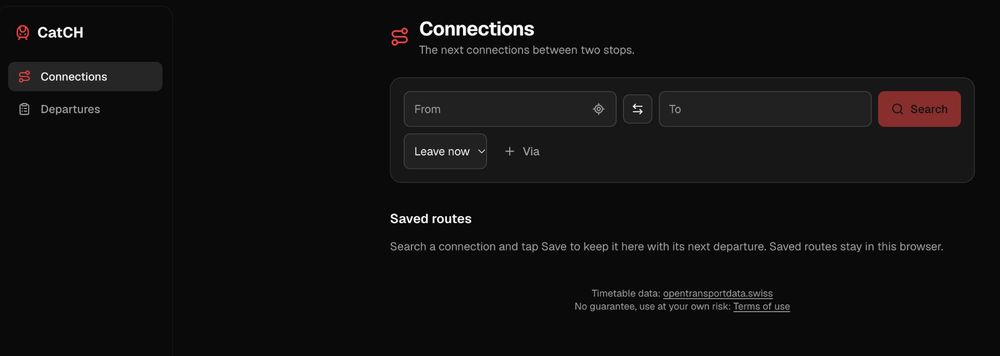
 Because of my living situation, I check train connections quite frequently, and I wanted to have a place where I could search using one tap instead of a page load, a cookie banner and a spinner. So I built CatCH: a small static site hosted on Cloudflare Pages that searches Swiss public transport with the same flow as sbb.ch, just lighter.
It is not a replacement for the official app. You can’t buy tickets, and there is no account. It does just one thing: show me the next connections between two stops, as fast as the network allows. If you want to try it out, check catch.jco.im.
What it does
If you have used sbb.ch, you already know how to use CatCH. The search form follows the same steps:
- Type a From and To stop (or tap Stops near me to use your location). A swap button flips them.
- Pick Leave now, Depart at or Arrive by, and optionally add a Via stop.
- Hit Search and get the next connections: departure time, products (IC, IR, S-Bahn, bus…), platform and number of changes.
- Open a connection to see each leg, walking transfers and the stops in between.
Two extras make it nicer: Saved routes pin trips I take often to the home screen, with a live “in 9 min” countdown to the next departure. A Departures tab shows the station board for any stop, like the yellow posters on the platform.
It also installs as a PWA on your phone, follows your system’s light or dark theme, and remembers your saved routes locally in the browser. No login, no tracking.
How it’s built
There is no backend. CatCH is an Astro site with a few React islands, built to plain HTML, CSS and JS and served from Cloudflare’s edge. The browser talks directly to the free Swiss public transport API at https://transport.opendata.ch/, which wraps the official timetable data from opentransportdata.swiss.