Migrating this blog to A s t r o


TL/DR: This is going to be a long post about how this blog has undergone several iterations and explain how recently I finished migrating it to Astro.

Since its creation in January 2016 as a new year’s resolution, this blog has undergone several iterations. Recently, I finished migrating it to Astro, a new framework that has gained a lot of popularity and secured a top position in the latest state of js survey. If you’re not familiar with Astro, it’s definitely worth checking out. The objective of this post is to describe what was the rationale behind choosing Astro for this project and the overall experience of this migration.

Astro on the map

Last January when the “State of JS” survey was released, I was eager to read it as usual. As I explain in my post some months ago, this online survey has been running since 2016 and collects and analyzes data from JS developers, and it is definitely a valuable tool to detect the current trends of the JS ecosystem and identify the upcoming trends.

One of the points that caught my attention in this issue, in the Rendering Frameworks section, was the popularity of “Astro”. This young project in just one year has doubled the interest expressed by developers so I decided to investigate a little more why it was so popular.

In the official documentation Astro defined itself as “an all-in-one web framework for building fast, content-focused websites.” But one of the key selling point is in the features part: “UI-agnostic: Supports React, Preact, Svelte, Vue, Solid, Lit and more.”. Perfect! that was exactly what I was looking for!

Evolution and why Astro

Previously mentioned, I initiated this blog in 2016 as a New Year’s resolution. Back then, I opted to use Google Spreadsheets as a “poor-man” CMS due to its convenience in configuring various blog fields and preserving blog content, while also obtaining a nice JSON response. However, as time passed, the API response underwent changes, prompting me to create a small wrapper to align with the previous response format.

On the other hand, like many other developers around the world I had the opportunity to work on a couple of projects with the amazing next.js framework and while I was browsing some of the documentation and examples I stumbled into the very useful gray matter npm package.

To put it simply, this package enables you to consolidate both data and metadata into a single text file by utilizing a “matter” section at the beginning of the file, which can then be transformed into a JSON object.

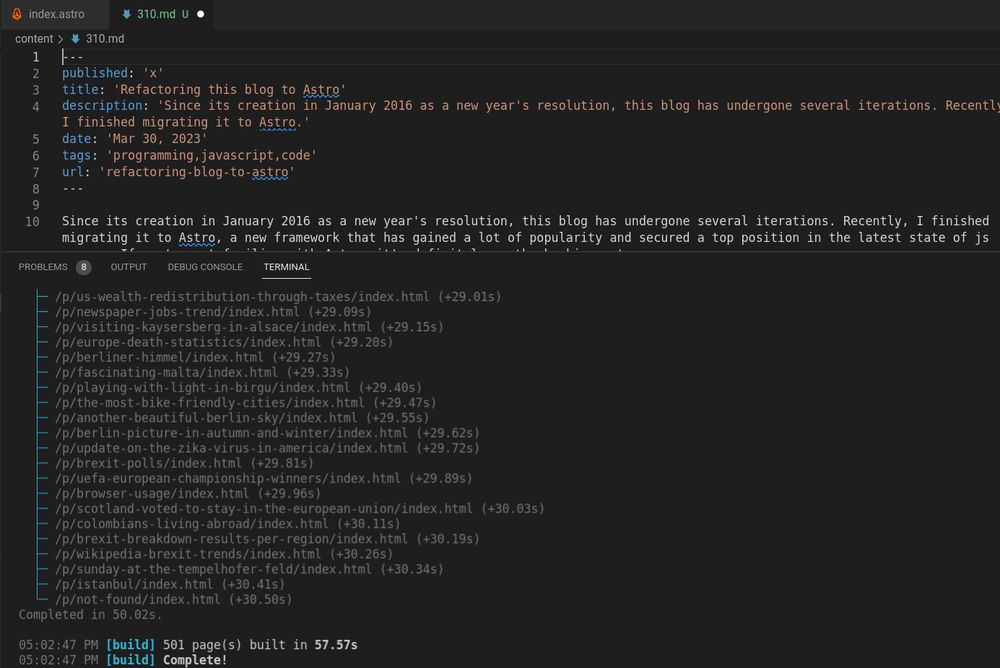
As I was already crafting my posts in markdown format and generating JSON file outputs in my previous Spreadsheets version, it was a straightforward task for me to migrate all of my posts into separate markdown files using this package and then I could combine these MD files into a single JSON file to be used as the “source” of this blog.

This was my approach for a period of time - I continued to utilize the same node.js express application, but with an alternate “static” JSON source that I could regenerate whenever necessary. However, given that this blog is essentially a static website, I had always entertained the notion of transitioning to a fully static site.

When I came across the Astro documentation, I was immediately convinced because it aligned seamlessly with the problem I was attempting to address:

  • To serve this blog fully static.
  • To make the code more maintainable.
  • To use a modern framework.
  • To keep the existing look and feel (and reusing the css styles as much as possible)
  • To reuse some of the existing vanilla javascript code.
  • To add some nice reusable React components I had used in some other projects.
  • To keep the nice JSX syntax I'm used working with React and Next.js


Experience

Having spent a week on this migration, my general perception as a developer is highly favorable. Throughout the project, I found Astro to be remarkably versatile and capable of supporting the reuse of existing code, adding custom style, and allowing component integration from other projects.

It is clear that the project is moving fast because some of the documentation I found on the internet was already outdated, but I found the official documentation to be of high quality overall. Most of my questions were promptly resolved through the official site without any problem.

I jumped start the project using the recommended npm create astro and adapted the generated template to my needs

In the Project Structure Section the official documentation describes the objective of the different parts of the application including Pages, Layouts and Components. I followed this recommended structure with a couple of additions:

  • I setup an additional `content` out of the src folder to put all my existing (and future new) `.md` blog posts.
  • I created an `utils` folder to place common utilities used across the different components and Astro pages.

    Not including every single file, my final project looks more or less like this tree:

    ├── Astro.config.mjs
    ├── content
    │   ├── 100.md
    │   ├── 101.md
    │   ├── 102.md
    │   ├── 103.md
    │   ├── ....
    ├── public
    │   └── jc-logo-g.png
    ├── src
    │   ├── components
    │   │   ├── BlogPosts.Astro
    │   │   └── ...
    │   ├── layouts
    │   │   ├── BlogHomepage.Astro
    │   │   └── Layout.Astro
    │   ├── pages
    │   │   ├── index.Astro
    │   │   ├── p
    │   │   │   └── [slug].Astro
    │   │   ├── page
    │   │   │   └── [page].Astro
    │   │   └── tag
    │   │       └── [tag].AstroW
    │   └── utils
    │       └── extractAllPostsWithIds.ts
    

    If you are familiar with next.js, having the routing pattern associated to the pages directory is probably familiar. On the other hand Astro defines layouts as “Astro components used to provide a reusable UI structure, such as a page template.”
    As discussed earlier, this migration was a really nice experience and I would probably use it again for a static site!.

  • State of JS Frontend Libraries


    State of JavaScript is an online survey that since 2016 collects and analyzes data from JS developers to detect the current trends of ecosystems and identify the upcoming trends. Quite interesting! A couple of days ago the 2022 version was released and the results are quite interesting.

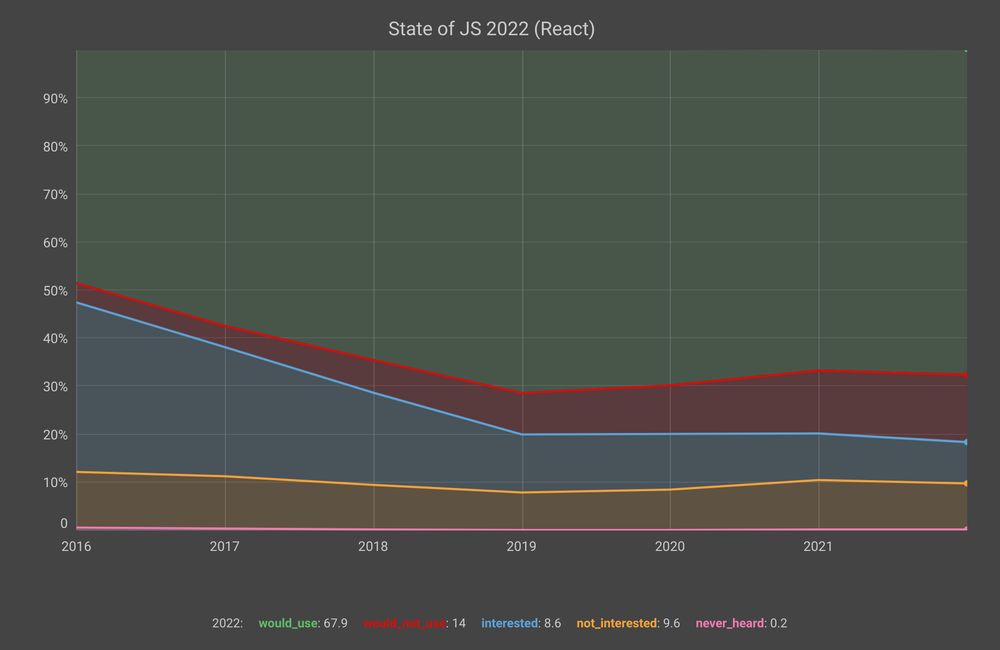
    React continues to be very strong both in number of users and its retention ratio (percentage of users who would use a library again). I have been lucky to work with this library in the last years of my professional life and despite its drawbacks, I can understand why it is still quite appealing.

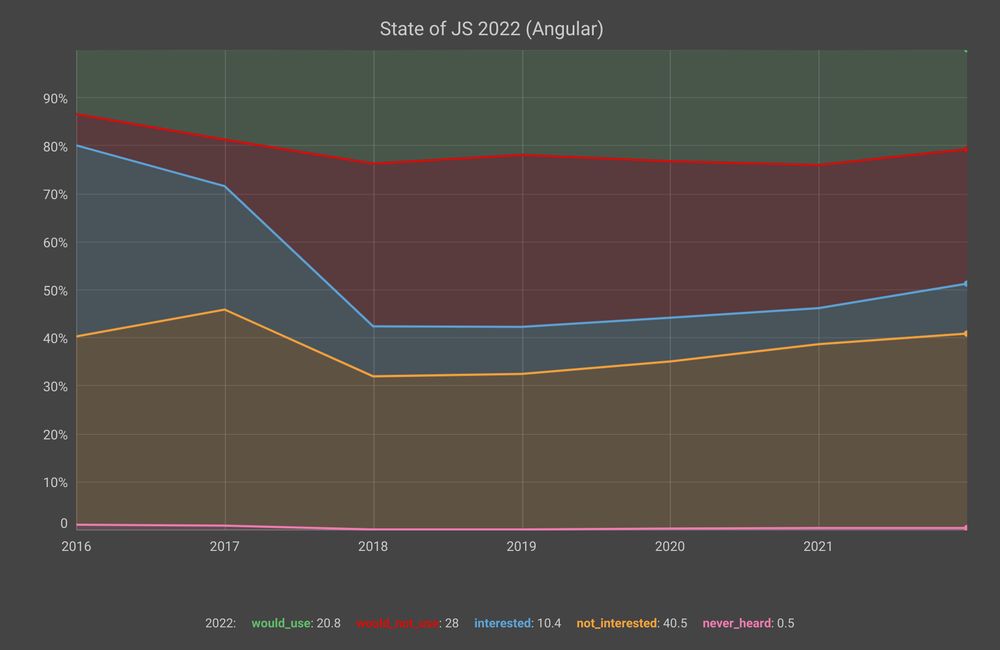
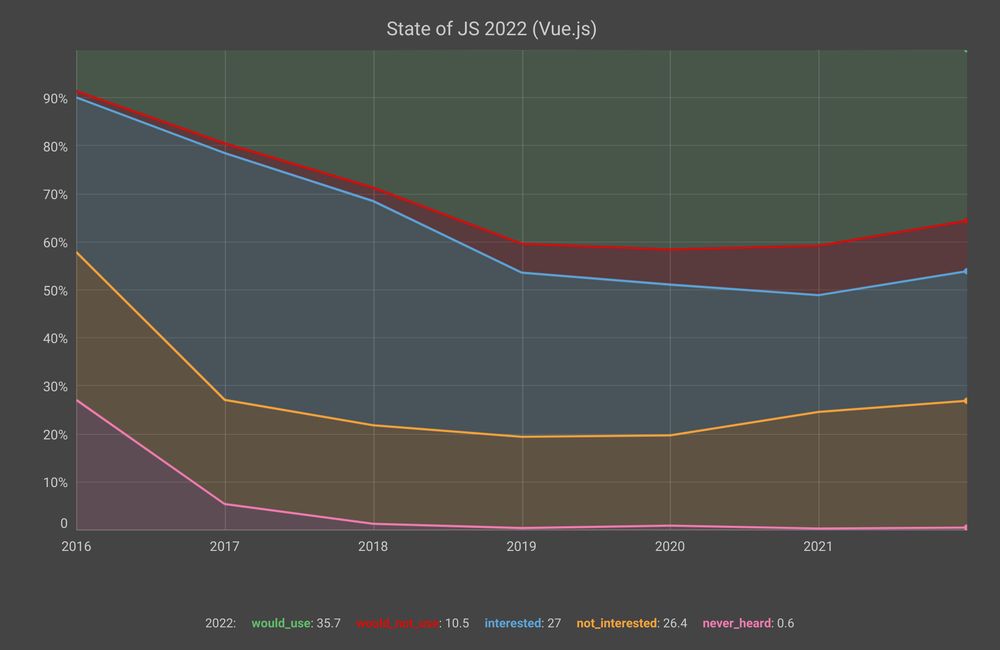
    It is also interesting to see what happens with the other two big ones (Angular and Vue.js):

    While Vue.js has similar retention levels to React, its number of users has not yet reached the same levels. Angular.js’s interest and retention levels are really low. This is surprising given that it is still one of the most sought after frameworks in the industry.

    Map, Filter and Reduce in JS


    JavaScript Fundamentals

    JavaScript is a high-level, dynamic, and interpreted programming language. It is one of the core technologies of the World Wide Web, alongside HTML and CSS. JavaScript allows developers to make web pages interactive, enabling features such as dynamic content updates, form validations, and complex user interfaces.

    Key Concepts

    Variables and Data Types

    JavaScript is dynamically typed, meaning you do not need to explicitly declare the data type of a variable. The primary data types include:

    • String: Textual data (e.g., "Hello World").
    • Number: Numeric data (e.g., 10, 3.14).
    • Boolean: Logical data (true or false).
    • Object: Complex data structures (e.g., { key: value }).
    • Array: Ordered lists of values (e.g., [1, 2, 3]).

    Declaration Keywords:

    • var: Older way to declare variables (function-scoped).
    • let: Used for variables that might be reassigned (block-scoped).
    • const: Used for constants—variables whose value cannot be reassigned (block-scoped).

    Functions

    Functions are blocks of reusable code designed to perform a specific task. They help organize code and prevent repetition.

    // Function declaration
    function greet(name) {
      return "Hello, " + name + "!";
    }
    
    // Arrow function (modern syntax)
    const calculateArea = (width, height) => {
      return width * height;
    };
    
    console.log(greet("Alice"));
    console.log(calculateArea(5, 10));
    

    Control Flow

    Control flow statements determine the order in which code is executed.

    • Conditionals (if/else if/else): Execute code blocks based on whether a condition evaluates to true or false.
    • Loops (for, while): Execute a block of code repeatedly until a specified condition is met.
    // For loop example
    for (let i = 0; i < 5; i++) {
      console.log("Count: " + i);
    }
    
    // While loop example
    let count = 0;
    while (count < 3) {
      console.log("Still counting...");
      count++;
    }
    

    Working with the DOM (Document Object Model)

    The DOM is the programming interface for HTML and XML documents. JavaScript uses the DOM to read, modify, and manipulate the structure and content of a web page.

    Selecting Elements

    You can select HTML elements using methods like getElementById, querySelector, and querySelectorAll.

    // Selects the element with the ID 'main-heading'
    const heading = document.getElementById('main-heading');
    
    // Selects the first element that matches the CSS selector '.card'
    const firstCard = document.querySelector('.card');
    
    // Selects all elements that match the CSS selector '.card'
    const allCards = document.querySelectorAll('.card');
    

    Manipulating Content and Styles

    Once an element is selected, you can change its content or styling.

    // Changing text content
    heading.textContent = "Welcome to JavaScript!";
    
    // Changing HTML content (use with caution due to XSS risks)
    heading.innerHTML = "Welcome! <strong>Learn More</strong>";
    
    // Changing CSS styles
    firstCard.style.backgroundColor = 'lightblue';
    

    Handling Events

    Event listeners allow your JavaScript code to respond to user actions, such as clicks, key presses, or mouse movements.

    const button = document.getElementById('myButton');
    
    // Attaches a function to run when the button is clicked
    button.addEventListener('click', () => {
      alert('Button was clicked!');
    });
    

    Asynchronous JavaScript

    Many operations in web development, such as fetching data from an API or setting a timer, do not complete instantly. These are asynchronous operations. JavaScript handles these using mechanisms like Promises and async/await.

    Fetching Data (API Calls)

    The fetch() API is the modern way to make HTTP requests.

    async function fetchUserData(userId) {
      try {
        // The 'await' keyword pauses execution until the Promise resolves
        const response = await fetch(`https://api.example.com/users/${userId}`);
        
        if (!response.ok) {
          throw new Error(`HTTP error! status: ${response.status}`);
        }
        
        const data = await response.json();
        console.log("User data:", data);
        return data;
        
      } catch (error) {
        console.error("Could not fetch user data:", error);
      }
    }
    
    // Example usage:
    fetchUser(1);
    

    Summary of Key Concepts

    ConceptPurposeExample
    DOM ManipulationChanging the structure, content, or style of an HTML page.element.innerHTML = 'New Content';
    Event HandlingResponding to user actions (clicks, key presses, etc.).button.addEventListener('click', handler);
    Asynchronous JSHandling operations that take time (network requests) without freezing the page.fetch() or async/await
    ScopeDetermining where variables are accessible within the code.let (block scope) vs. var (function scope)