Do we still need axios?


Yesterday a hacker compromised the account of the lead developer of axios> — the npm package with around 100 million weekly downloads — and published two malicious versions that included a remote access Trojan targeting macOS, Windows and Linux.

The malicious code was pulled from a staged dependency called "plain-crypto-js" and was designed to self-destruct after execution. It was only live for about three hours, but that was enough: security firm Huntress reported the first infection on a monitored endpoint just 89 seconds after the compromised version was published.

According to StepSecurity, the malicious dependency was staged 18 hours in advance, three payloads were pre-built for three operating systems, and both release branches were poisoned within 39 minutes of each other. Google's security team has linked the attack to a North Korean group that targets cryptocurrency theft.

This got me thinking: do we actually still need axios? The original reason it became so popular was that it gave you a clean, consistent API for making HTTP requests that worked the same way in the browser and in Node.js. But Node.js has had native fetch since version 18 and it's been stable for a while now. The browser has had it for years. So the problem axios originally solved is basically gone.

For my typical axios usage, I wrote a simple fetch wrapper called fetchios that mirrors the axios API — same .get(), .post(), .create(), interceptors and all. It works as a drop-in module so I don't have to change the code everywhere, just copy the file in utils, swap the import and remove axios from my dependencies.

Every dependency you add is a potential attack surface — and this incident is a perfect reminder of that. Maybe it's time to stop running npm install axios by inertia and check what the platform already gives you.

Another day running a VPS


I run a small VPS for some personal projects, and I often check the SSH logs to see who’s trying to break in. I have the standard setup: key-based authentication, password login disabled, non-default ssh port and fail2ban configured to block IPs after a few failed attempts. But that doesn’t stop the bots from trying.

This week, I decided to do a little analysis of the SSH logs to see where the attacks are coming from and the results are not surprising but still interesting.

Nearly 31,000 failed login attempts from the top 20 IPs alone. Russia takes the lead with 45% of attacks (20,742 attempts), followed by the US at 30% (8,163 attempts). One particularly persistent Russian IP tried over 9,600 times. Points for determination, I guess?

The geographic diversity is almost impressive: Russia, US, China, Brazil, and South Korea are all represented. It’s like a World Cup of “please let me into your server.”

This is just life when you have an ssh server exposed to the internet. I decided to add some additional security measures this week after seeing the data, but I wanted to share the conclusion of this analysis as a public service to anyone else who might be running a VPS with SSH access.

Stay safe out there.


Top 20 most common IP addresses

RankIP AddressCountryAttempts% bar
1176.120.22.47Russia9,621████████████████
2209.38.216.89United States5,613█████████
345.140.17.124Russia4,013███████
4176.120.22.13Russia2,271████
587.121.84.136Russia2,252████
691.202.233.33Russia1,166██
7167.99.72.161United States1,100██
8222.120.161.213China1,087██
945.135.232.92Russia631
10210.79.142.221South Korea602
11165.22.216.148United States553
12216.10.242.161United States436
1347.251.142.10China360
145.104.86.151Russia300
1545.148.10.121Russia288
1668.183.234.194United States237
17181.116.220.140Brazil232
18209.38.85.78United States224
19189.50.142.82Brazil222
20157.173.199.44Russia193

Migrating this blog to A s t r o


TL/DR: This is going to be a long post about how this blog has undergone several iterations and explain how recently I finished migrating it to Astro.

Since its creation in January 2016 as a new year’s resolution, this blog has undergone several iterations. Recently, I finished migrating it to Astro, a new framework that has gained a lot of popularity and secured a top position in the latest state of js survey. If you’re not familiar with Astro, it’s definitely worth checking out. The objective of this post is to describe what was the rationale behind choosing Astro for this project and the overall experience of this migration.

Astro on the map

Last January when the “State of JS” survey was released, I was eager to read it as usual. As I explain in my post some months ago, this online survey has been running since 2016 and collects and analyzes data from JS developers, and it is definitely a valuable tool to detect the current trends of the JS ecosystem and identify the upcoming trends.

One of the points that caught my attention in this issue, in the Rendering Frameworks section, was the popularity of “Astro”. This young project in just one year has doubled the interest expressed by developers so I decided to investigate a little more why it was so popular.

In the official documentation Astro defined itself as “an all-in-one web framework for building fast, content-focused websites.” But one of the key selling point is in the features part: “UI-agnostic: Supports React, Preact, Svelte, Vue, Solid, Lit and more.”. Perfect! that was exactly what I was looking for!

Evolution and why Astro

Previously mentioned, I initiated this blog in 2016 as a New Year’s resolution. Back then, I opted to use Google Spreadsheets as a “poor-man” CMS due to its convenience in configuring various blog fields and preserving blog content, while also obtaining a nice JSON response. However, as time passed, the API response underwent changes, prompting me to create a small wrapper to align with the previous response format.

On the other hand, like many other developers around the world I had the opportunity to work on a couple of projects with the amazing next.js framework and while I was browsing some of the documentation and examples I stumbled into the very useful gray matter npm package.

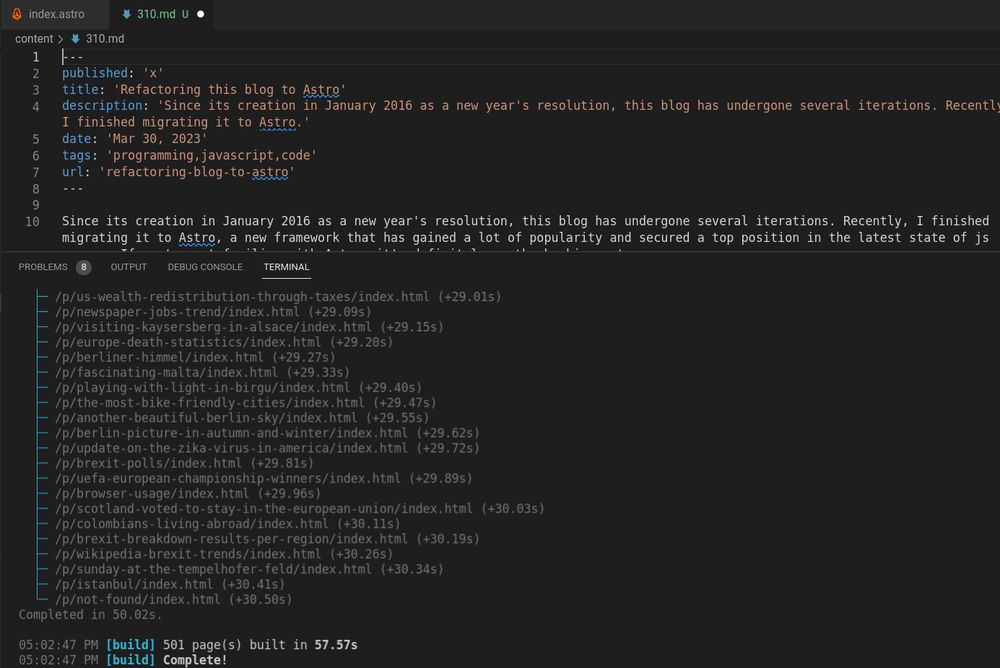
To put it simply, this package enables you to consolidate both data and metadata into a single text file by utilizing a “matter” section at the beginning of the file, which can then be transformed into a JSON object.

As I was already crafting my posts in markdown format and generating JSON file outputs in my previous Spreadsheets version, it was a straightforward task for me to migrate all of my posts into separate markdown files using this package and then I could combine these MD files into a single JSON file to be used as the “source” of this blog.

This was my approach for a period of time - I continued to utilize the same node.js express application, but with an alternate “static” JSON source that I could regenerate whenever necessary. However, given that this blog is essentially a static website, I had always entertained the notion of transitioning to a fully static site.

When I came across the Astro documentation, I was immediately convinced because it aligned seamlessly with the problem I was attempting to address:

  • To serve this blog fully static.
  • To make the code more maintainable.
  • To use a modern framework.
  • To keep the existing look and feel (and reusing the css styles as much as possible)
  • To reuse some of the existing vanilla javascript code.
  • To add some nice reusable React components I had used in some other projects.
  • To keep the nice JSX syntax I'm used working with React and Next.js


Experience

Having spent a week on this migration, my general perception as a developer is highly favorable. Throughout the project, I found Astro to be remarkably versatile and capable of supporting the reuse of existing code, adding custom style, and allowing component integration from other projects.

It is clear that the project is moving fast because some of the documentation I found on the internet was already outdated, but I found the official documentation to be of high quality overall. Most of my questions were promptly resolved through the official site without any problem.

I jumped start the project using the recommended npm create astro and adapted the generated template to my needs

In the Project Structure Section the official documentation describes the objective of the different parts of the application including Pages, Layouts and Components. I followed this recommended structure with a couple of additions:

  • I setup an additional `content` out of the src folder to put all my existing (and future new) `.md` blog posts.
  • I created an `utils` folder to place common utilities used across the different components and Astro pages.

    Not including every single file, my final project looks more or less like this tree:

    ├── Astro.config.mjs
    ├── content
    │   ├── 100.md
    │   ├── 101.md
    │   ├── 102.md
    │   ├── 103.md
    │   ├── ....
    ├── public
    │   └── jc-logo-g.png
    ├── src
    │   ├── components
    │   │   ├── BlogPosts.Astro
    │   │   └── ...
    │   ├── layouts
    │   │   ├── BlogHomepage.Astro
    │   │   └── Layout.Astro
    │   ├── pages
    │   │   ├── index.Astro
    │   │   ├── p
    │   │   │   └── [slug].Astro
    │   │   ├── page
    │   │   │   └── [page].Astro
    │   │   └── tag
    │   │       └── [tag].AstroW
    │   └── utils
    │       └── extractAllPostsWithIds.ts
    

    If you are familiar with next.js, having the routing pattern associated to the pages directory is probably familiar. On the other hand Astro defines layouts as “Astro components used to provide a reusable UI structure, such as a page template.”

    As discussed earlier, this migration was a really nice experience and I would probably use it again for a static site!.

  • State of JS Frontend Libraries


    State of JavaScript is an online survey that since 2016 collects and analyzes data from JS developers to detect the current trends of ecosystems and identify the upcoming trends. Quite interesting! A couple of days ago the 2022 version was released and the results are quite interesting.

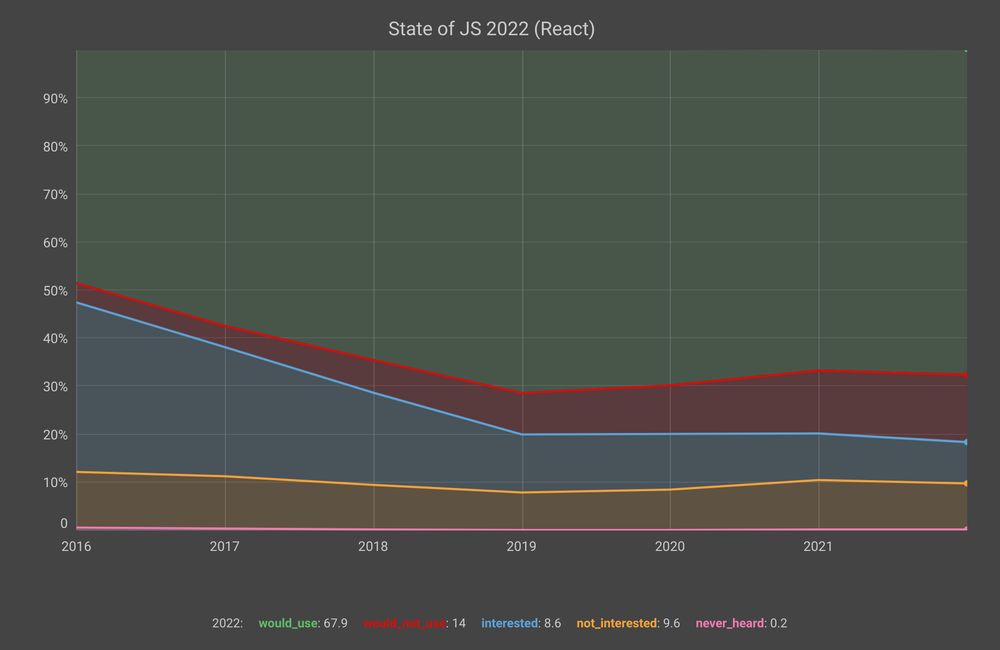
    React continues to be very strong both in number of users and its retention ratio (percentage of users who would use a library again). I have been lucky to work with this library in the last years of my professional life and despite its drawbacks, I can understand why it is still quite appealing.

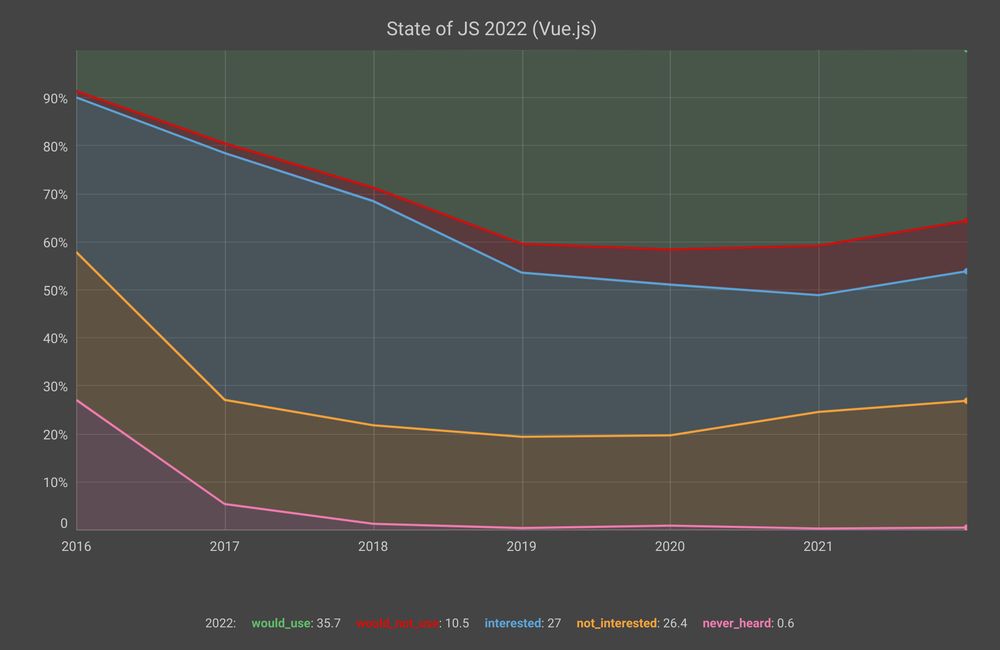
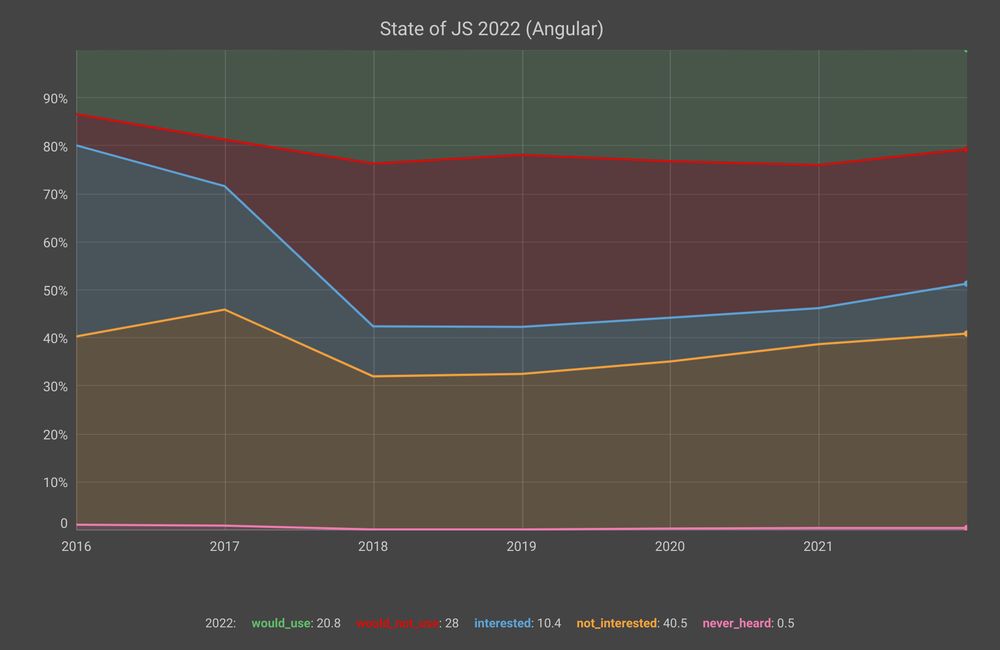
    It is also interesting to see what happens with the other two big ones (Angular and Vue.js):

    While Vue.js has similar retention levels to React, its number of users has not yet reached the same levels. Angular.js’s interest and retention levels are really low. This is surprising given that it is still one of the most sought after frameworks in the industry.

    Map, Filter and Reduce in JS


    JavaScript Fundamentals

    JavaScript is a high-level, dynamic, and interpreted programming language. It is one of the core technologies of the World Wide Web, alongside HTML and CSS. JavaScript allows developers to make web pages interactive, enabling features such as dynamic content updates, form validations, and complex user interfaces.

    Key Concepts

    Variables and Data Types

    JavaScript is dynamically typed, meaning you do not need to explicitly declare the data type of a variable. The primary data types include:

    • String: Textual data (e.g., "Hello World").
    • Number: Numeric data (e.g., 10, 3.14).
    • Boolean: Logical data (true or false).
    • Object: Complex data structures (e.g., { key: value }).
    • Array: Ordered lists of values (e.g., [1, 2, 3]).

    Declaration Keywords:

    • var: Older way to declare variables (function-scoped).
    • let: Used for variables that might be reassigned (block-scoped).
    • const: Used for constants—variables whose value cannot be reassigned (block-scoped).

    Functions

    Functions are blocks of reusable code designed to perform a specific task. They help organize code and prevent repetition.

    // Function declaration
    function greet(name) {
      return "Hello, " + name + "!";
    }
    
    // Arrow function (modern syntax)
    const calculateArea = (width, height) => {
      return width * height;
    };
    
    console.log(greet("Alice"));
    console.log(calculateArea(5, 10));
    

    Control Flow

    Control flow statements determine the order in which code is executed.

    • Conditionals (if/else if/else): Execute code blocks based on whether a condition evaluates to true or false.
    • Loops (for, while): Execute a block of code repeatedly until a specified condition is met.
    // For loop example
    for (let i = 0; i < 5; i++) {
      console.log("Count: " + i);
    }
    
    // While loop example
    let count = 0;
    while (count < 3) {
      console.log("Still counting...");
      count++;
    }
    

    Working with the DOM (Document Object Model)

    The DOM is the programming interface for HTML and XML documents. JavaScript uses the DOM to read, modify, and manipulate the structure and content of a web page.

    Selecting Elements

    You can select HTML elements using methods like getElementById, querySelector, and querySelectorAll.

    // Selects the element with the ID 'main-heading'
    const heading = document.getElementById('main-heading');
    
    // Selects the first element that matches the CSS selector '.card'
    const firstCard = document.querySelector('.card');
    
    // Selects all elements that match the CSS selector '.card'
    const allCards = document.querySelectorAll('.card');
    

    Manipulating Content and Styles

    Once an element is selected, you can change its content or styling.

    // Changing text content
    heading.textContent = "Welcome to JavaScript!";
    
    // Changing HTML content (use with caution due to XSS risks)
    heading.innerHTML = "Welcome! <strong>Learn More</strong>";
    
    // Changing CSS styles
    firstCard.style.backgroundColor = 'lightblue';
    

    Handling Events

    Event listeners allow your JavaScript code to respond to user actions, such as clicks, key presses, or mouse movements.

    const button = document.getElementById('myButton');
    
    // Attaches a function to run when the button is clicked
    button.addEventListener('click', () => {
      alert('Button was clicked!');
    });
    

    Asynchronous JavaScript

    Many operations in web development, such as fetching data from an API or setting a timer, do not complete instantly. These are asynchronous operations. JavaScript handles these using mechanisms like Promises and async/await.

    Fetching Data (API Calls)

    The fetch() API is the modern way to make HTTP requests.

    async function fetchUserData(userId) {
      try {
        // The 'await' keyword pauses execution until the Promise resolves
        const response = await fetch(`https://api.example.com/users/${userId}`);
        
        if (!response.ok) {
          throw new Error(`HTTP error! status: ${response.status}`);
        }
        
        const data = await response.json();
        console.log("User data:", data);
        return data;
        
      } catch (error) {
        console.error("Could not fetch user data:", error);
      }
    }
    
    // Example usage:
    fetchUser(1);
    

    Summary of Key Concepts

    ConceptPurposeExample
    DOM ManipulationChanging the structure, content, or style of an HTML page.element.innerHTML = 'New Content';
    Event HandlingResponding to user actions (clicks, key presses, etc.).button.addEventListener('click', handler);
    Asynchronous JSHandling operations that take time (network requests) without freezing the page.fetch() or async/await
    ScopeDetermining where variables are accessible within the code.let (block scope) vs. var (function scope)

    Vue.js very popular in the last year


    Some weeks ago when I finished working, I was about to leave the building and I saw in the wall a sheet of paper with information about a vue.js meetup here in Berlin. I thought I had never heard about this vue.js and the more I read, the more interested I became in this front-end javascript framework.

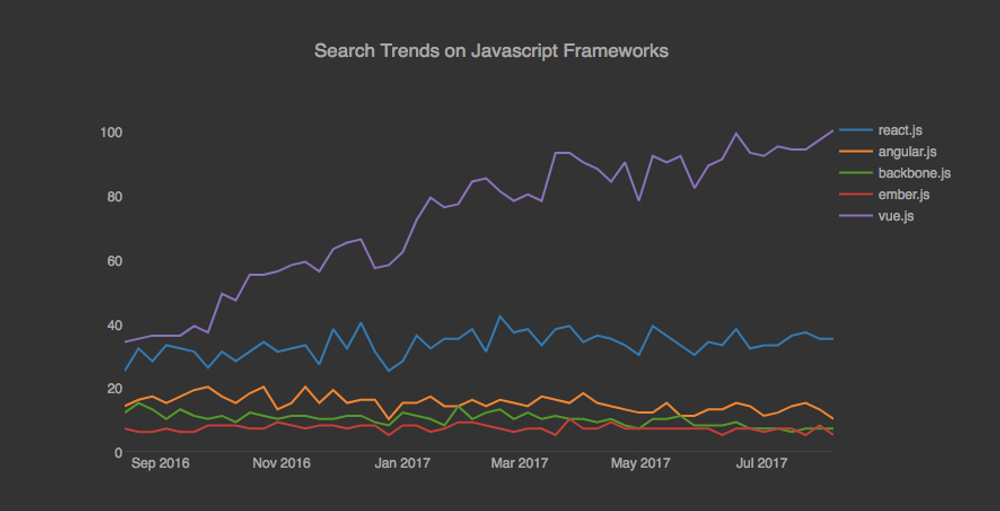
    Google Search trends show vue.js has been the most popular framework in the last 12 months. Vue.js is self-described as "a progressive framework for building user interfaces. Unlike other monolithic frameworks, Vue is designed from the ground up to be incrementally adoptable". I gave it a go and it's quite interesting.

    R vs Python in Data Science


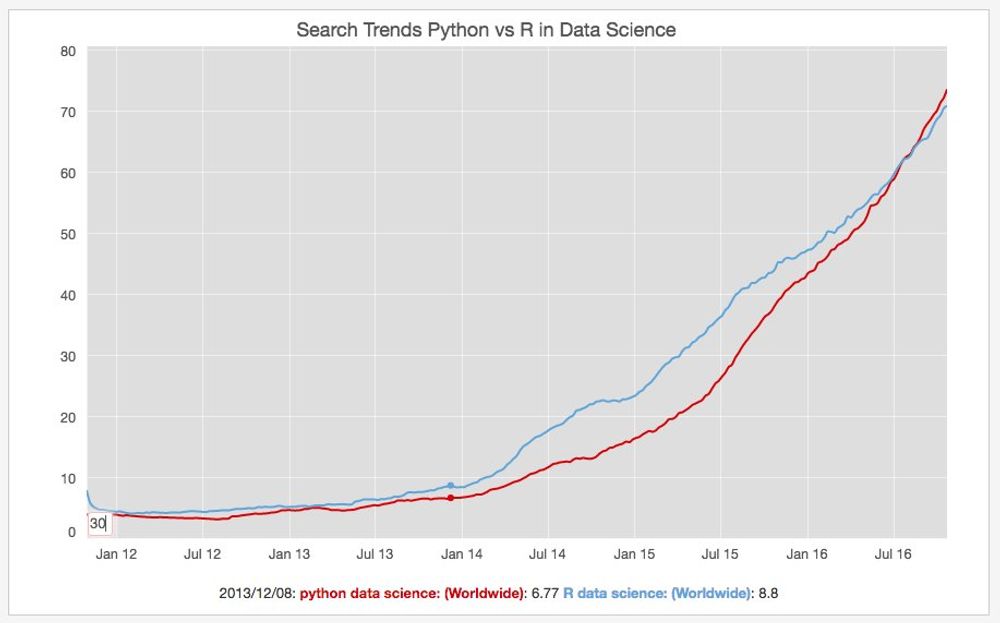
    I have been using Python for many years and I recognize how powerful it is with libraries like Pandas and Scikit-Learn for Data Science. In a previous role, I had the opportunity to use R, but I haven't touched it in a while. I was curious to see what the interest is in R vs Python in the Google Search Trends. You can see the graph above plotted with this data source.

    Most popular Javascript Frameworks


    Last weekend I finished converting the FX calculator I developed during my career break to React.js. I have briefly touched some code at work but I wanted to get my hands dirty and understand better the advantages and the challenges of this library.

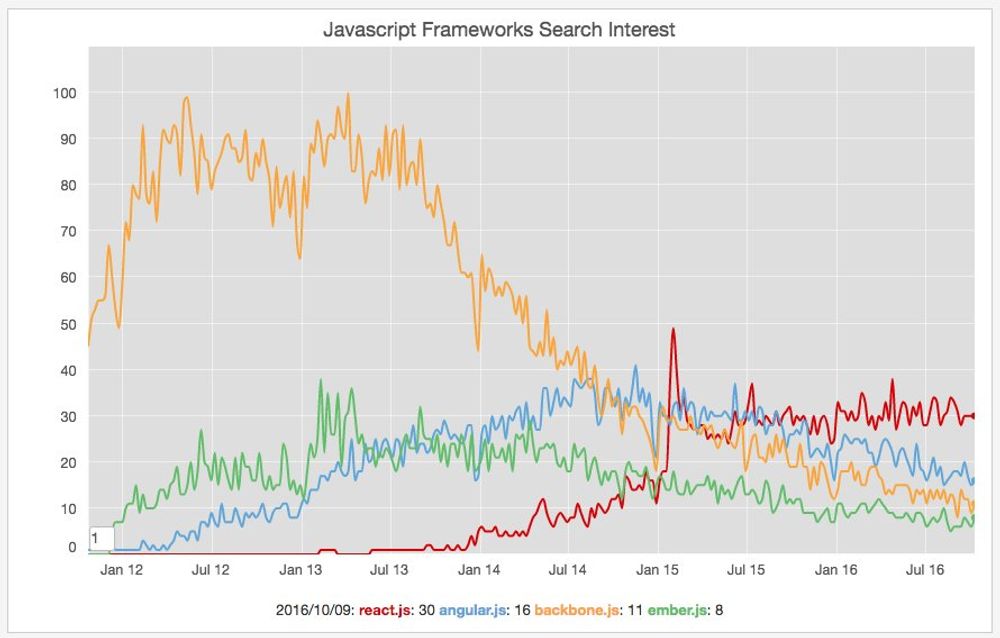
    I was also checking today some interesting [Google Trends data](https://t.co/aCOxxTOhUo) about the most popular JavaScript frameworks in terms of search interest, and React is definitively winning the interest war.

    React Trending


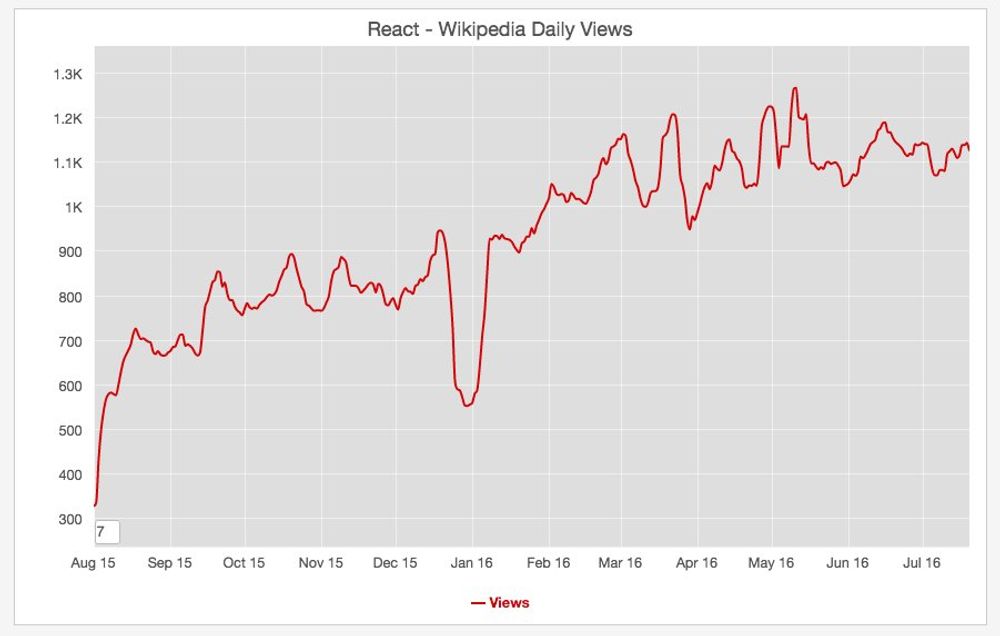
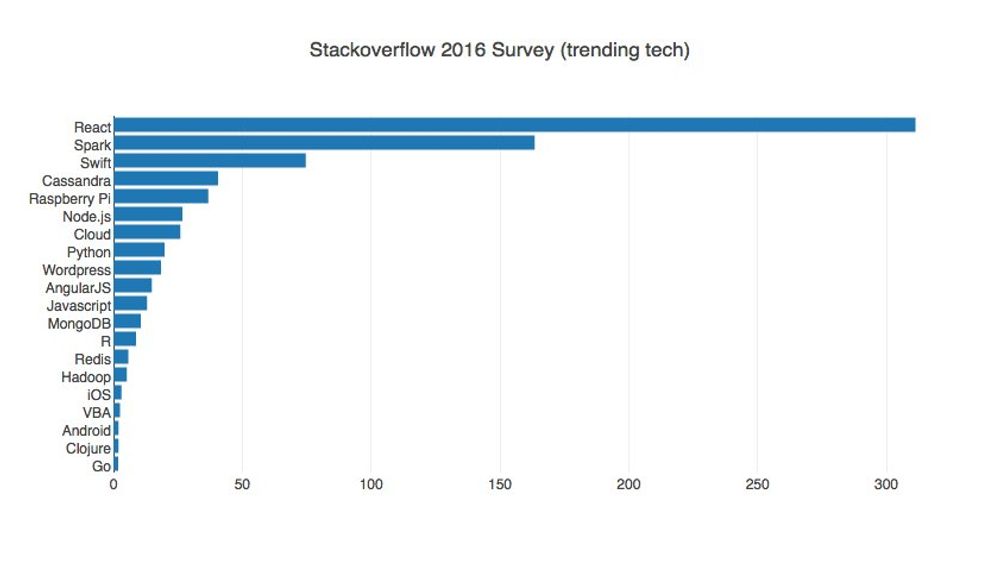
    I was discussing it with a colleague a couple of days ago. The Facebook React is definitely going to stay around. Look at the previous graphs showing the increase in Wikipedia page views during the last year and the trend increase in Stack Overflow.

    2016: New Blog.


    In this new year, one of my resolutions was to dust off my social accounts and update them regularly.

    I also thought it would be interesting to use my personal website to keep a blog with the most noteworthy updates from those social profiles, or to write about anything that comes to mind. However, I didn't want to spend a lot of time setting up yet another blog using WordPress or something similar. It was an interesting experience when I did it for my career break, but this time around I wanted a simpler solution.

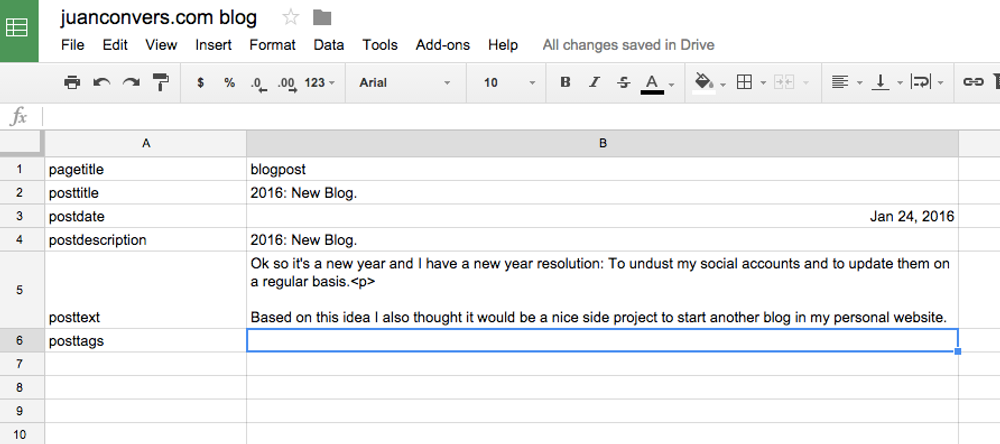
    Based on my recent experience writing back and forth to Google Spreadsheets, I decided to use it as a super simple CMS. Through this approach, I can write posts directly in the spreadsheet interface and include the HTML tags I need, such as this bold or this italic, as well as links to various media elements I might want to include in the posts.

    Once I'm happy with a particular post, I can export its contents as a JSON file, which I then parse and display in my application. In the image on the right, you can see how my CMS looks :). I essentially used the request Node module to get the JSON string and then parse it within my application:

    What I like about this approach is that I can iterate over the JSON object returned by Google Spreadsheets and extract each value I’m interested in, then push them to my local JSON object.

    When I render the data on the frontend, I can access those fields quite easily. I’ll probably write a detailed post later on about how the process works, but for now, I’m happy with the results.

    Note: When I wrote this original post, I was using Google Spreadsheets. Nowadays, I’ve completely switched to a Markdown-only approach.